Point of sale
Take orders at the counter or by phone on your tablet.
Updated November 17, 2026
What it does
Take orders at the counter or by phone on your tablet. It works offline, takes split payments and prints the receipt.
Turn it on
- Open Modules in the dashboard menu.
- Find Point of sale in the list and switch it on.
If your plan does not include this module, its card has no switch. Click Request this module and our team will get back to you. See Turn modules on and off.
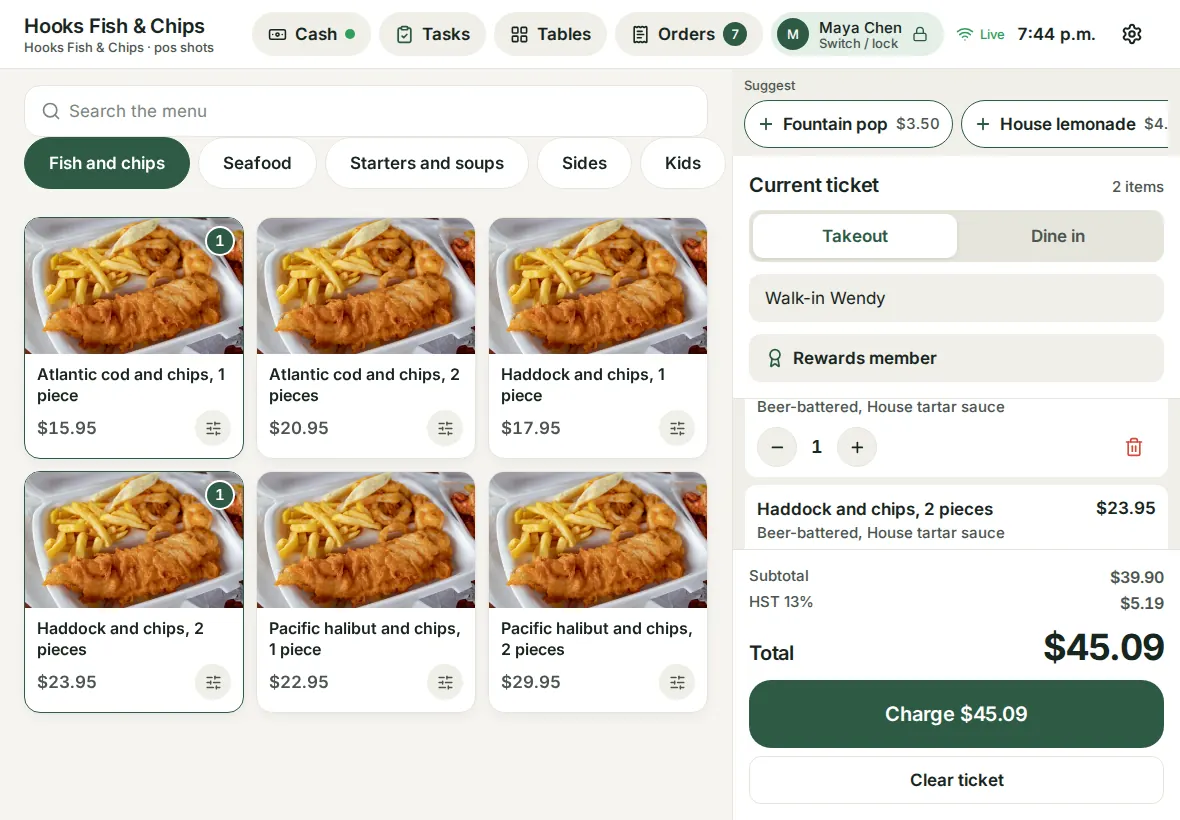
Use it day to day
- Pair a tablet in Counter POS mode, open the tablet app and sign in with your PIN.
- Tap items, pick options, and tap Charge. Choose Cash or card, or Split the check between guests.
- If the internet drops, keep selling. Orders sync when it comes back.
- Discounts, comps and voids need a manager PIN (Manager approval).
Common questions
Can I take card payments at the counter?
Yes. Add a Stripe smart reader with the Card readers module, or take the card on a separate card terminal (choose Card). Cash works without either. See Payments with Stripe.
What happens to offline sales?
They are saved on the tablet and sent when the connection returns. Card payments need a connection.