Reservations
Guests book a table online.
Updated November 17, 2026
What it does
Guests book a table online. You set how many people you can seat, and Kitchon confirms and reminds them for you.
Turn it on
- Open Modules in the dashboard menu.
- Find Reservations in the list and switch it on.
If your plan does not include this module, its card has no switch. Click Request this module and our team will get back to you. See Turn modules on and off.
Use it day to day
- Open Reservations and the Settings tab. Under Capacity and turn times set the Capacity model, and set the Slot interval, Last seating and Book up to.
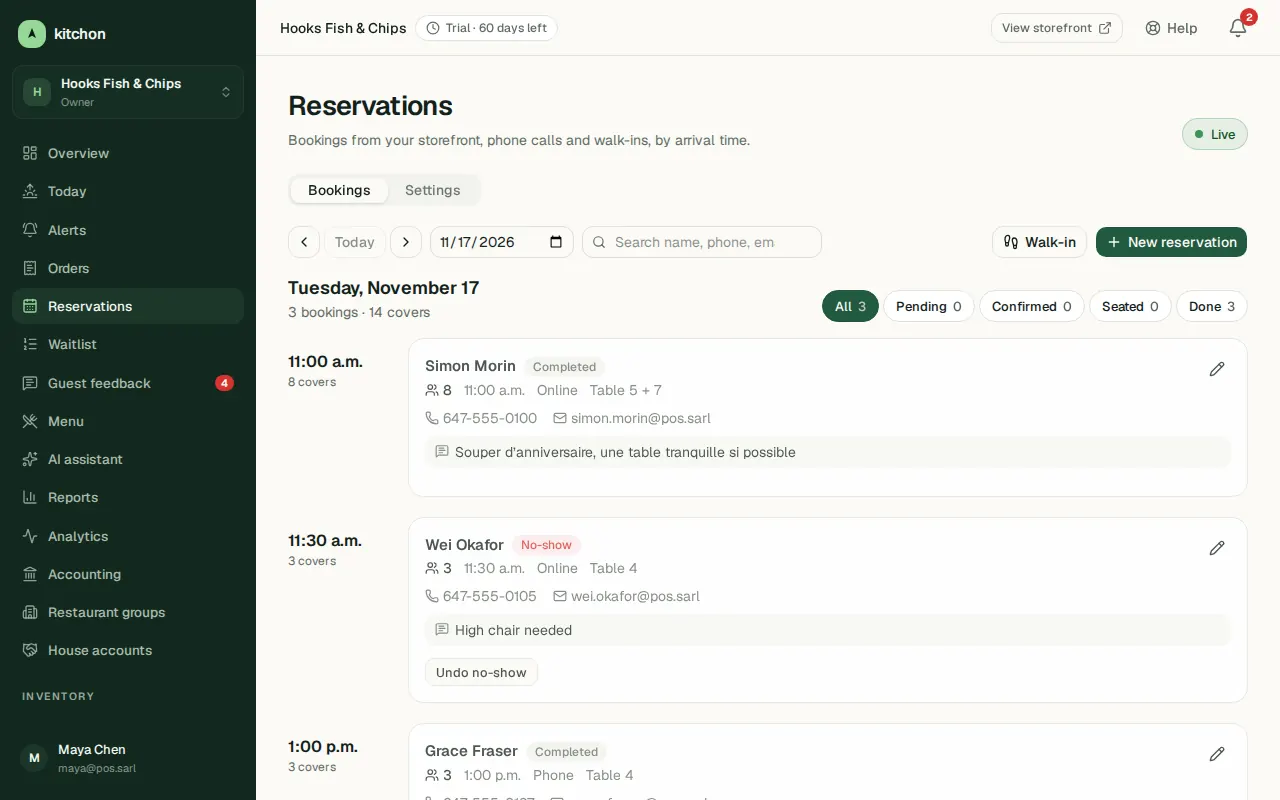
- On the Bookings tab, filter by Pending, Confirmed, Seated or Done. Use Add reservation for phone calls, Seat when a party arrives and Seat walk-in for guests without a booking.
- Block out a night for a private event with Blackout dates in the Settings tab.
- With Confirm bookings automatically off, each online booking waits as Pending until you Approve or Decline it.
- Email reminders go to guests 24 hours and 2 hours before arrival, and guests can cancel or change their booking from the email link.
Common questions
Can I ask for a deposit?
Yes. Under Deposits and no-show protection in the Settings tab you can ask for a card on file or a deposit. It needs your Stripe account connected and online card payments switched on in Payments. Guests see the policy when they book.
How do I stop no-shows?
Reminders reduce them. A deposit or card hold is the strongest tool if you need one.